Open source offline PDF converter and compressor

Merge, split, compress, convert, rotate, and repair PDF files locally on your own device. No uploads, no cloud processing, and no document leakage risk.

Download Free

No signup required

Compare Plans
SafePDF application banner showcasing privacy-focused PDF operations interface

SafePDF is a privacy-first desktop PDF toolkit for people searching for an offline PDF converter, PDF compressor, PDF merger, PDF splitter, and open source PDF software that keeps documents on-device.

Key features

OFF

Offline Processing

All PDF operations run entirely on your local device without requiring any internet connection, ensuring your sensitive files never leave your computer or get uploaded to external servers.

PRV

Privacy‑Focused

This privacy-first toolkit implements minimal telemetry practices and provides clear, transparent consent controls for managing optional cookies, giving you complete control over your data.

OSS

Open Source

The complete source code for SafePDF is publicly available on GitHub under the GPL‑3.0 license, allowing anyone to review, audit, and contribute to the project's development.

CMP

Smart Compression

Our intelligent compression engine offers multiple quality presets and advanced image controls, allowing you to find the perfect balance between reduced file size and maintained visual quality.

SPL

Split & Extract

Easily split large PDF documents by individual pages, specific page ranges, or extract single pages quickly for sharing or further processing as separate files.

MRG

Merge PDFs

Combine multiple PDF documents into a single unified file with the ability to reorder pages and arrange content exactly how you need it before exporting the final document.

IMG

Export Images

Export individual PDF pages as high‑quality AVIF or JPG images, perfect for creating previews, thumbnails, or preparing content for further image processing and editing.

TXT

Text Conversion

Convert PDF documents to searchable plain text format or editable DOCX files, making it easy to reuse content, perform text analysis, or continue editing in word processors.

ROT

Rotate Pages

Rotate individual pages or entire documents non‑destructively, preserving the original content quality while fixing orientation issues in scanned or incorrectly formatted PDF files.

RPR

Repair PDFs

Attempt to recover and repair corrupted or damaged PDF files by salvaging readable pages and reconstructing document structure to retrieve as much content as possible.

MET

Metadata Editing

Quickly edit and update PDF metadata including document title, author information, subject fields, keywords, and other properties to better organize and identify your files.

CLI

CLI & Automation

Automate repetitive PDF tasks using command-line interface examples and scripts, perfect for batch processing large numbers of documents or integrating into existing workflows.

Swipe or use arrows to browse all features.

Screenshots

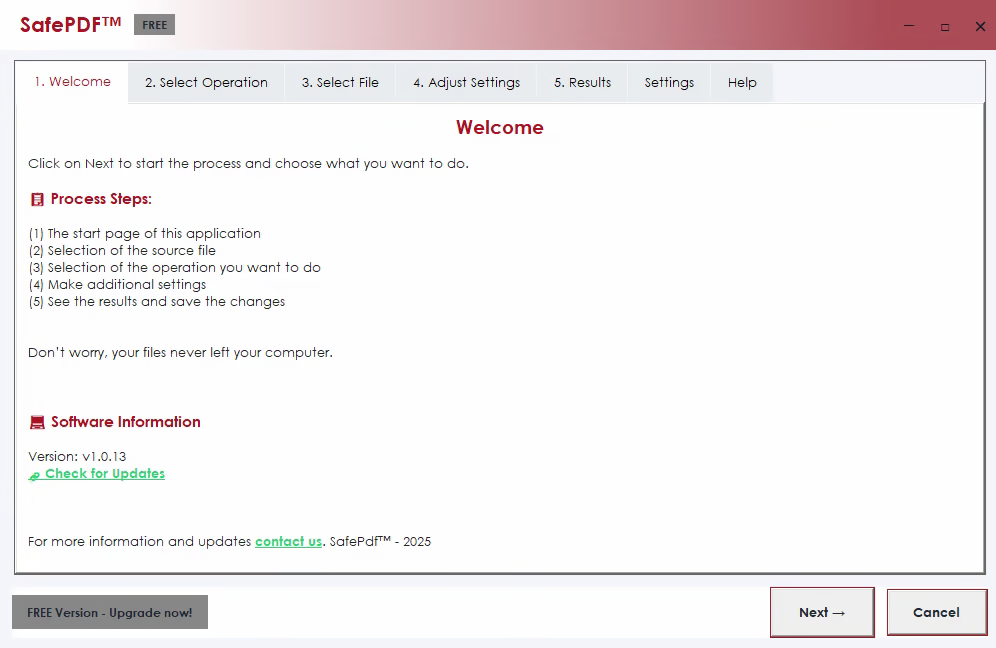
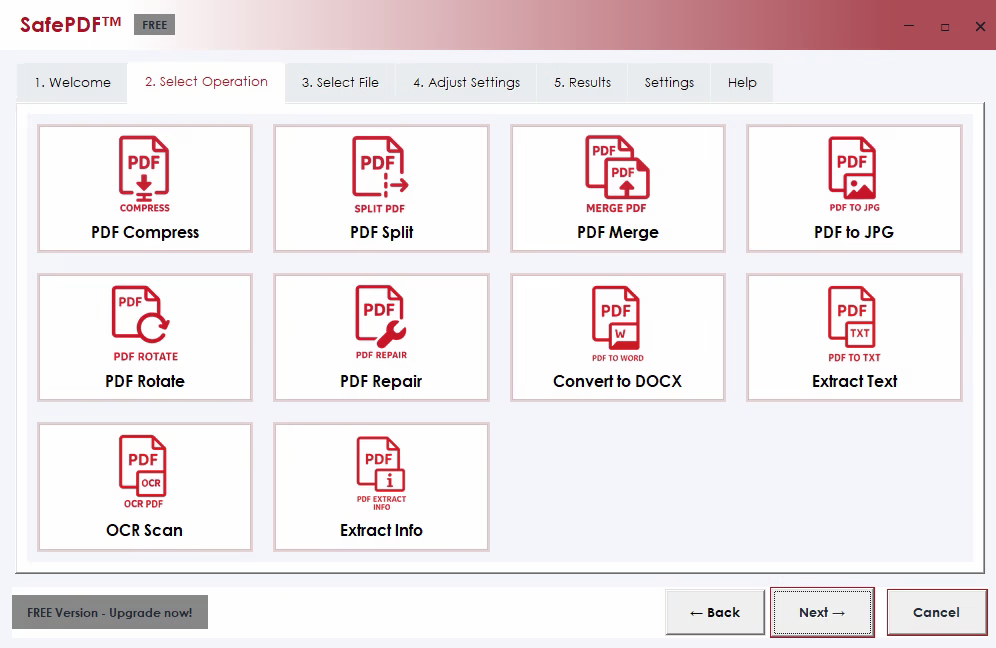
SafePDF main application window showing PDF operation options SafePDF operations interface displaying file selection and processing controls

Why users choose offline PDF tools

Search traffic usually comes from real problems, not brand names. These are the reasons people look for local PDF software instead of upload-based websites.

Confidential files should stay local

Invoices, contracts, ID scans, medical records, HR files, and legal documents often contain data users do not want to upload to third-party servers. SafePDF processes those files on the same device where they already live.
Offline work is more reliable

Teams working on trains, in secure office networks, or with unstable internet still need to merge, split, compress, and convert PDFs. Local tools keep working even when the connection does not.

Repeated PDF tasks need a real app

Upload forms are fine for one quick file. They are frustrating for recurring workflows like document cleanup, page extraction, format conversion, and batch processing. A desktop PDF tool is faster for everyday work.

Core PDF tasks SafePDF handles locally

These are the common search intents SafePDF is built for, especially when users want a private PDF converter or offline PDF editor alternative.

Compress PDF files offline

Reduce PDF file size for email, uploads, and archiving without sending documents to an online compression service.

Merge PDF files on-device

Combine invoices, reports, scans, and signed documents into one PDF locally with no upload step.

Split PDF pages privately

Extract page ranges, save single pages, and reorganize long documents directly on your computer.

Convert PDF and office files

Handle PDF to Word, PDF to Excel, PDF to JPG, Word to PDF, JPG to PDF, PNG to PDF, and related conversion workflows with local processing.

Repair and rotate PDFs

Fix orientation issues, recover readable pages from damaged files, and clean up documents without exposing sensitive content.

Use open source PDF software

Review the code on GitHub, verify how the app works, and use a PDF toolkit that is transparent about privacy and licensing.

Guides for privacy-focused PDF workflows

These pages target broader questions users search before they decide which PDF tool to trust.

Supported PDF converters and export tools

Convert PDF files to and from popular formats with an offline PDF converter that keeps documents private on your computer.

PDF to Word

PDF to Word

Convert PDF files to editable Microsoft Word documents in DOCX format while preserving original formatting, layouts, fonts, and document structure for seamless editing.

Convert to Word
PDF to Excel

PDF to Excel

Extract tables, numerical data, and structured content from PDF documents and convert them into editable Excel spreadsheets in XLSX format for further analysis.

Extract to Excel
PDF to PowerPoint

PDF to PowerPoint

Transform static PDF presentations into fully editable PowerPoint files in PPTX format, allowing you to modify slides, update content, and customize presentations as needed.

Convert to PPTX
PDF to JPG

PDF to JPG

Convert individual PDF pages into high-quality JPG image files with customizable resolution and compression settings, perfect for web publishing or image galleries.

Convert to JPG
PDF to PNG

PDF to PNG

Export PDF pages as PNG images with full transparency support and lossless quality, ideal for graphics work, web design, or when transparency is required.

Export to PNG
PDF to Text

PDF to Text

Extract all plain text content from PDF documents into readable text files, making it easy to search, analyze, copy, or reuse the textual information.

Extract Text

Frequently asked questions about offline PDF software

Why use an offline PDF tool instead of an online converter?

Offline tools are useful when files contain confidential information, internet access is limited, or users need repeated PDF work without upload delays. See detailed guide on offline tools.

Can local PDF processing still handle common tasks?

Yes. SafePDF covers conversions, compression, splitting, merging, rotation, repair, and export workflows on-device without needing internet.

Who searches for private PDF tools?

People handling contracts, invoices, client records, research notes, HR forms, and scanned IDs often want a PDF app that keeps files local. Learn why privacy matters in PDF processing.

Is SafePDF an open source PDF tool?

Yes. SafePDF is totally open source and published on GitHub, which helps users review the project and understand how local PDF processing works.

What should I know before uploading files to online PDF tools?

Online converters upload files to external servers. This creates privacy risks for sensitive documents. SafePDF keeps everything local. Read about secure PDF processing.

Does SafePDF work as a desktop PDF app for Windows, macOS, and Linux?

Yes. The site offers downloads for all major operating systems. Once installed, SafePDF provides a private PDF converter that needs no cloud service.

Ready to process PDFs locally?

Start with the free version, then upgrade when you need advanced automation and support.

Download Free

No signup required

View Pro Features

Upgrade to SafePDF Pro

Unlock advanced features, priority support, and an ad-free experience.

-33%

30 Days

€4.99 €3.34

  • Full Pro features for 30 days
Buy for 30 Days
-45%

90 Days

€11.99 €6.59

  • Full Pro features for 90 days
Request Access

Payments processed securely via Gumroad. No files are uploaded to our servers. Powered by Gumroad

Regional prices are calculated based on regionalpricecalculator.com